 Tether
Self-hosted fleet hub for Linux boxes and Macs
Every Linux box,
one place.
A tiny Rust agent on each box dials out to your hub — like a GitLab runner. You get the box list, their web ports and SSH through it. No inbound ports, no VPN, no port forwarding.
curl -fsSL https://<your-hub>/install.sh | sudo bash -s -- --token <registration-token>That's the whole onboarding. Your hub's address and a token — the web app shows the exact command under Add box.
The whole setup in one picture
Boxes dial out to the hub. You log in to the hub's web UI from any device, see every box, open its web ports with a click and drop into a shell on it right in the browser — or ssh in from your own terminal.
How it works
Run the hub
One container on Kubernetes (Helm chart included) or anywhere Docker runs. SQLite inside, nothing else to operate.
Add a box
Create a registration token in the web app and paste the one-liner on the box. The agent registers itself and installs a service that starts at boot — systemd on Linux, launchd on a Mac.
Connect
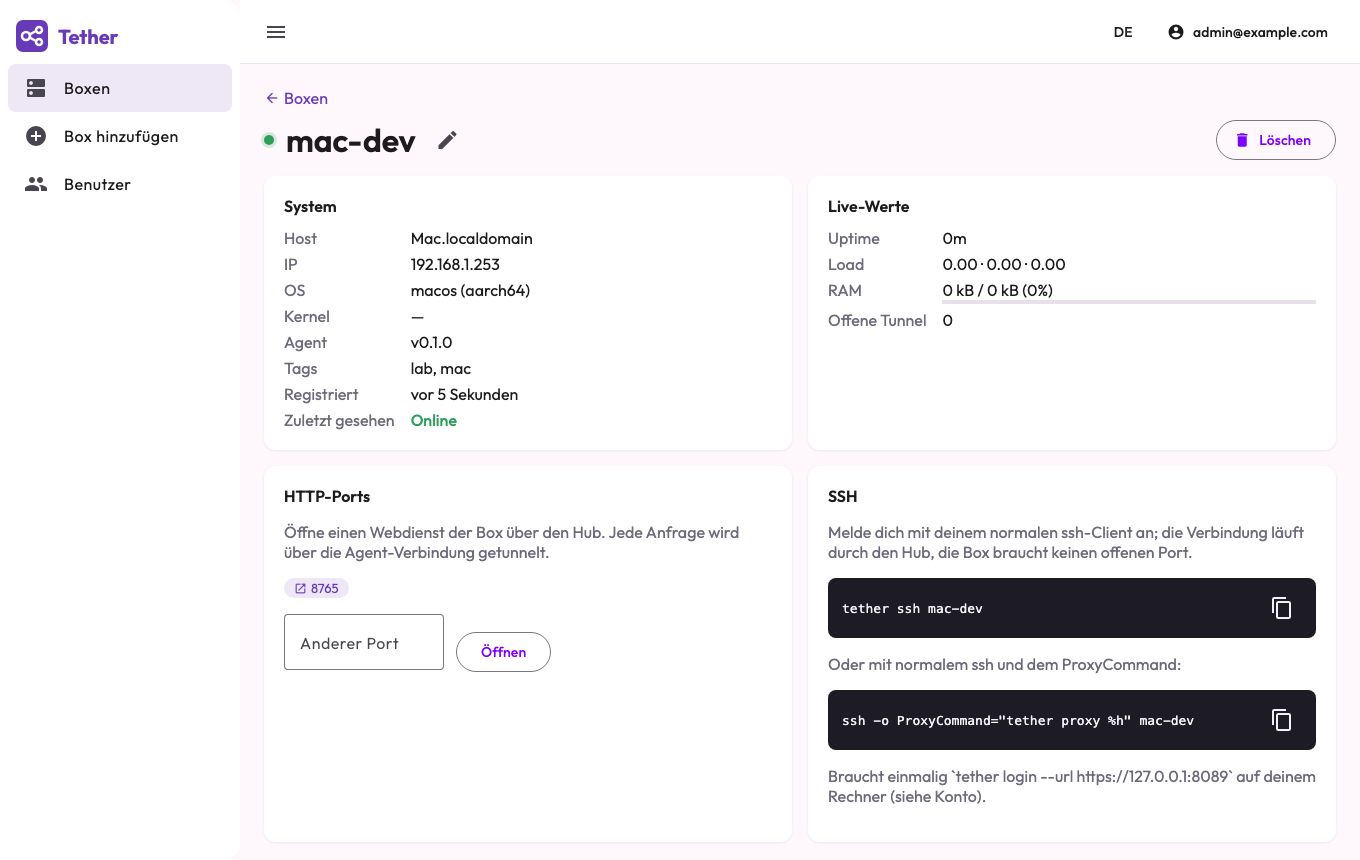
Click a port to open its web UI through the hub, or tether ssh box1 from your laptop — plain OpenSSH, tunnelled through the hub.
Built for boxes you don't control the network of
Outbound only
Agents open one WebSocket to the hub and keep it alive. Works behind NAT, LTE, hotel Wi-Fi and corporate firewalls.
SSH stays SSH
The hub forwards ciphertext as a ProxyCommand. Your keys, your known_hosts, your ssh config — nothing new to learn.
HTTP ports, one click
Grafana, a Jupyter notebook, a device admin page: every listening port shows up and opens through the hub, behind your login.
One static binary
5 MB, musl, no dependencies, x86_64 and aarch64. 3 MB of RAM at runtime, under a hardened systemd unit. Footprint →
Macs, too
The same one-liner tethers a Mac (Apple silicon or Intel, macOS 11+), or brew install it. Web terminal, ports and tether ssh work like on any box. Mac install →
Tokens like a runner
Registration tokens onboard boxes; each box then holds its own secret. Revoke a token without touching registered boxes.
Two-factor sign-in
Optional TOTP second factor per user — Microsoft Authenticator, Google Authenticator, 1Password or any TOTP app. The web UI and the CLI both ask for the code.
Audit log
Every login and failed attempt, password and 2FA change, token, user and box change, and every SSH or HTTP session through the hub — with who, when and from which IP. Kept 180 days.
Fleet facts at a glance
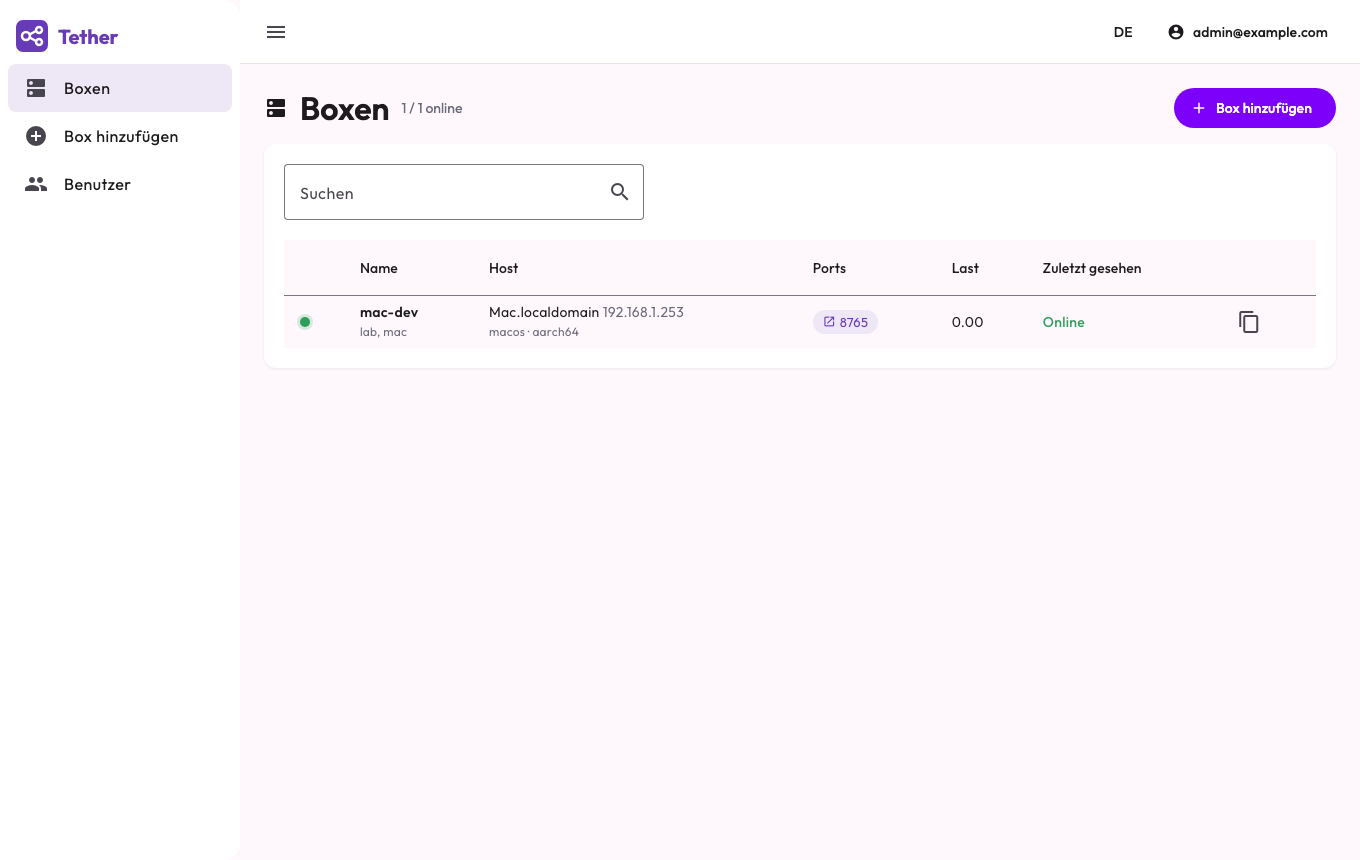
Agent version, OS release, kernel, CPU count, RAM and disk usage of every box, refreshed every 15 seconds for metrics and every 5 minutes for system facts.
Self-hosted freeware
Free of charge for personal and commercial use. The hub runs on your cluster, so box names, metrics and tunnels never leave your infrastructure.
Small footprint, on the box and on the cluster
Measured on the current release, idle with one box connected. No database server, no Redis, no message broker — one process on the box, one container on the cluster.
On every Linux box
- 5 MB static binary, zero dependencies, nothing to apt-get
- 3 MB resident memory, one process, idle CPU ≈ 0 %
- 1 outbound connection, a 15 s heartbeat of a few hundred bytes
- Runs as an unprivileged user; fine for a Raspberry Pi or a 512 MB VPS
On Kubernetes
- 1 container, 1 replica, 1 Gi volume — the whole Helm chart
- 25 MB resident memory; chart requests 50 m CPU / 64 Mi
- 40 MB image pull (101 MB on disk), web app and agents included
- SQLite inside the container: backup = copy one file
Or just Docker
- Same image runs on a single VM with
docker run - Starts in under a second, ready to onboard boxes immediately
- Hundreds of boxes per hub: each idle connection costs a few kB
Live view of every box
Hostname, IPs, OS, kernel, load, memory, uptime and listening ports — refreshed with every heartbeat.
Ready in ten minutes
Helm chart, Docker image and static agents are on the download page. The docs walk you through the first box.